Upload the complete program
Keep day headers, time columns, track names, venue maps, timezone notes, and any legend for session types.
Upload a conference agenda, program image, or event PDF. Review sessions across days and tracks, remove overlaps you will not attend, and export a personal calendar for the event.
Checking available credits…
Conference programs describe everything available. Your calendar should describe the sequence you selected, including the rooms and transition time you need.
These fictional source schedules and event previews match the prepared reference ICS below. A new AI conversion may need corrections.
Readable source example
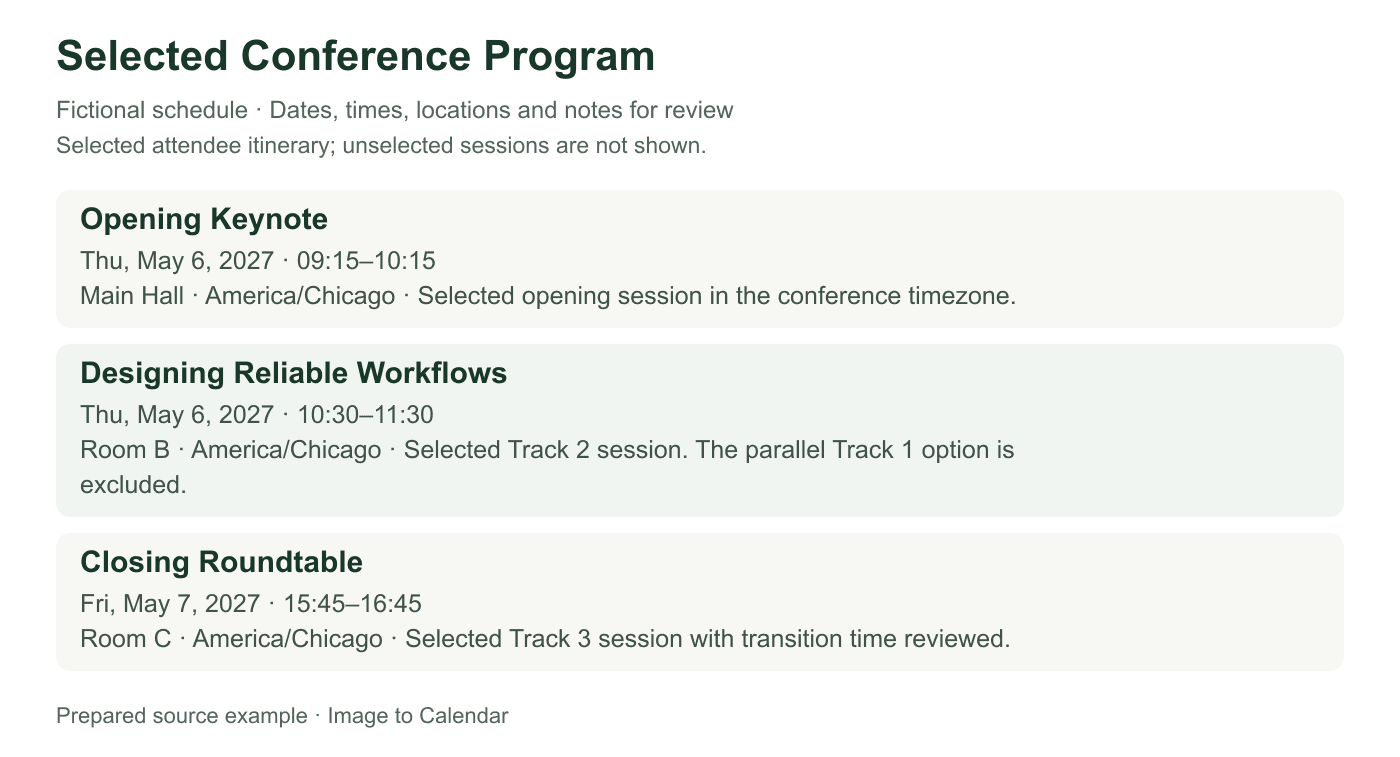
Verifiable example
This source shows one attendee's selected itinerary rather than the full program. Keep its dates, conference timezone, track notes, and rooms together when checking the reference export.
| Time | Selected session | Track / room | Conflict decision |
|---|---|---|---|
| May 6 · 09:15 | Opening Keynote | Main Hall | No parallel selection |
| May 6 · 10:30 | Designing Reliable Workflows | Track 2 / Room B | Track 1 alternative excluded |
| May 7 · 15:45 | Closing Roundtable | Track 3 / Room C | Allow time to reach Room C |
| Update | Calendar response | Duplicate risk |
|---|---|---|
| Room change | Edit LOCATION on the existing event | Low when the event is updated in place |
| Speaker substitution | Update notes only if attendance plan changes | No new event needed |
| Full revised program | Compare selected sessions before replacing | High if the entire file is imported twice |
Keep day headers, time columns, track names, venue maps, timezone notes, and any legend for session types.
Confirm each session title, day, time, room, track, and delivery mode, then remove competing alternatives.
Download the selected sessions, import them into a separate calendar, and inspect transitions and timezone display.
Multi-track programs rely on row and column alignment, so visual context matters as much as the words inside each session card.
A session box may show a title without repeating its track or room; include the column labels that supply that context.
Programs reuse the same clock rows on several days, making a visible day heading essential for every extracted session.
Back-to-back sessions in different buildings or virtual rooms may need a buffer that the published grid does not include.
A conference program is a catalog of possibilities rather than a finished personal plan. Conversion works best when extraction and session selection remain separate decisions.
Conference grids encode meaning through position. A session title inside the second column may inherit its track and room from a header far above, while its start and end align with times printed on the left edge. Crop too tightly and the event can lose both pieces of context. Include the complete grid when it remains readable, or divide it into sections that repeat the relevant day, time, track, and room headers in every capture.
Programs spanning several pages may repeat clock rows without repeating the date prominently. Use page titles, colored day tabs, or section headings to confirm which date applies before export. When a session card spans two time rows, verify whether that shape indicates its duration or merely a visual design choice. Compare the next scheduled row and any published session detail rather than calculating a finish from box height alone.
Parallel tracks intentionally offer more sessions than one attendee can join. Importing every extracted card can fill the calendar with simultaneous alternatives and hide the itinerary you actually need. Review the event list as a personal selection step. Keep the keynote, workshops, meetings, and social events you plan to attend, and remove competing sessions or place them in notes only while you decide.
Some sessions require registration, have limited capacity, or target a particular ticket type. A listing in the program does not prove that you have access. Preserve a visible registration requirement in the description and confirm it with the organizer before relying on the event. Avoid placing access tokens, private meeting URLs, or attendee credentials in a calendar that might be shared. The public schedule and your admission details have different privacy expectations.
An in-person event normally publishes times in the venue's local timezone, while a virtual or hybrid conference may show a conference zone, the viewer's detected zone, or several offsets. Identify which convention the source uses before assigning a timezone to the exported events. If the program changes display based on account settings, a screenshot should retain the timezone label that was visible when it was captured.
Travel can make the destination calendar display sessions differently before and after arrival. Keep the named event timezone and let the calendar app convert it instead of rewriting all clocks manually. For a global livestream with a fixed UTC time, verify the date as well as the hour because the local occurrence may fall on the previous or following day. Open one imported session on the device you will use at the event to confirm the display.
Published sessions may be back-to-back even when their rooms are far apart. The calendar file should preserve the official boundaries, but your personal planning may benefit from a separate travel or preparation event. Do not silently shorten a talk to create a buffer, because that changes the program record. Instead, choose feasible sessions and add private reminders or blocks after import according to the venue map and your priorities.
Breaks and meals are worth exporting when they anchor the day, specify a location, or include a scheduled activity. Generic open time does not need to become an event. Networking receptions, sponsor demonstrations, and office hours may have flexible windows; represent the published window accurately and use notes to indicate drop-in behavior. This keeps the calendar informative without reproducing every visual block from the agenda.
Speakers cancel, rooms change, and organizers adjust schedules during an event. The imported ICS is a snapshot and will not follow those updates. Check the official conference app, announcement channel, or current program for changes, then edit only the affected calendar events. Importing a newly generated full program over the original can create two copies of unchanged sessions and leave you unsure which room is current.
A separate conference calendar makes revisions safer and allows the whole itinerary to be hidden or removed after the event. Before relying on it, spot-check sessions from different days and tracks, plus any virtual or evening entry. Confirm titles, boundaries, timezone, room, and notes against the source. The uploaded agenda is not permanently stored by this app, but you should still remove attendee lists, private invitations, or personal meeting details that are unrelated to the public program.
Nothing is sent to your calendar until you have checked the extracted result.
Yes. Keep the track and time headers visible, then select only the sessions that belong in your personal agenda.
Review the alternatives and export the session you expect to attend. The converter does not decide which conflict is best for you.
Yes. Confirm the timezone displayed by the source and check a representative event after importing on the device you will use.
No. An ICS download is a snapshot. Edit changed sessions or deliberately replace an isolated conference calendar.