Capture the complete flyer
Include the title, date area, venue, timezone, small-print deadline, and any legend that explains multiple sessions.
Upload a photo, screenshot, or PDF of an event flyer. Separate the event itself from registration deadlines and promotional text, edit every extracted field, and export the events you want.
Checking available credits…
A single handout may advertise several sessions and one registration cutoff. Each meaningful date can be reviewed as its own calendar entry.
These fictional source schedules and event previews match the prepared reference ICS below. A new AI conversion may need corrections.
Readable source example
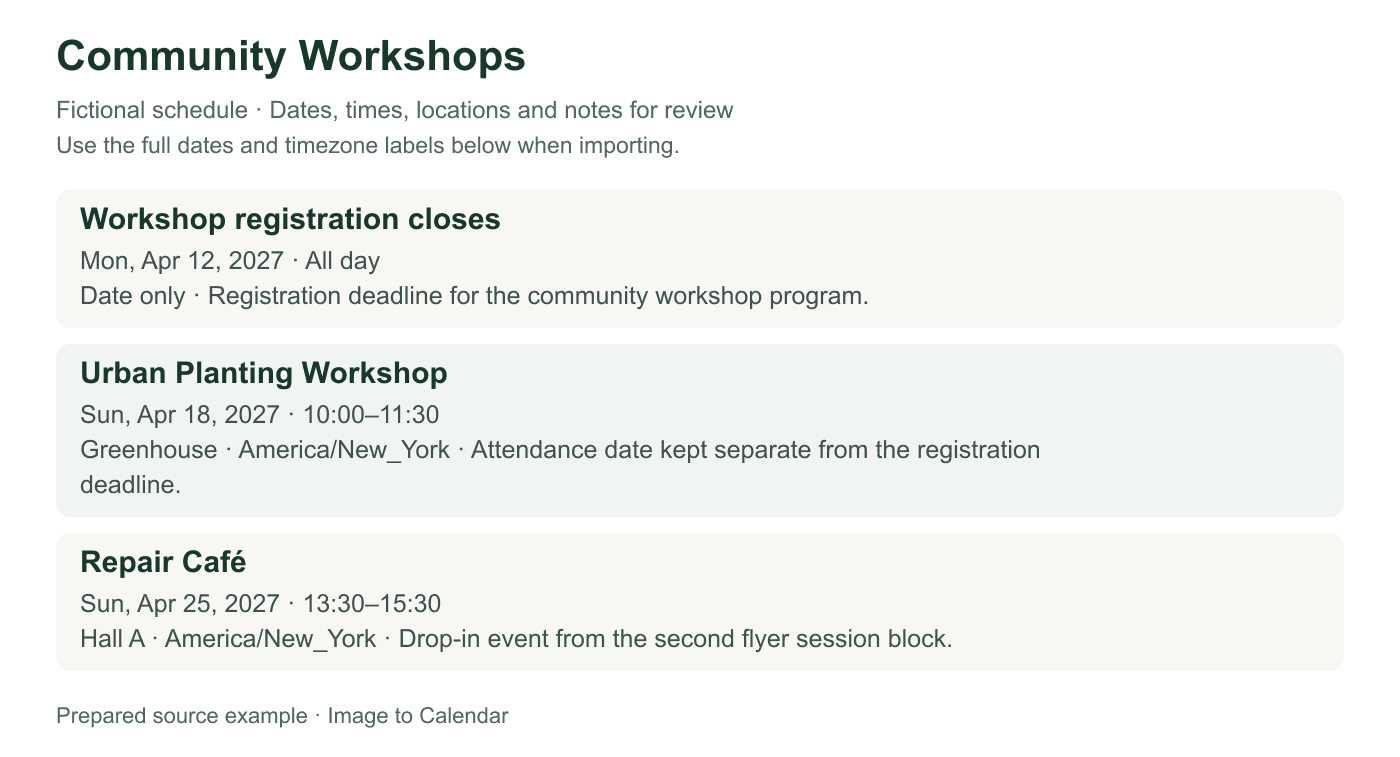
Verifiable example
The example keeps attendance dates separate from the registration cutoff and records why each visible date becomes a different kind of calendar entry.
| Visible date | Nearby label | Calendar title | Event type |
|---|---|---|---|
| April 12 | Register by | Workshop registration closes | All-day deadline |
| April 18 · 10:00 | Urban Planting | Urban Planting Workshop | Timed attendance |
| April 25 · 13:30 | Repair Café | Repair Café | Timed drop-in event |
Include the title, date area, venue, timezone, small-print deadline, and any legend that explains multiple sessions.
Decide whether each date is an event, a registration cutoff, a sale window, or unrelated promotional information.
Edit the selected events and deadlines, exclude decorative noise, and download one reviewed calendar file.
Flyers optimize for attention rather than data entry, so preserve the visual relationships that explain each date.
Avoid glare, folds, steep angles, and shadows across small date text; use a second close capture when the fine print is essential.
Words such as doors, starts, register by, and early-bird change what a date means and should remain visible.
A flyer may use one headline venue and different rooms for individual sessions, so check locations event by event.
A poster can scatter essential event details across illustrations, badges, footnotes, and repeated date blocks. A careful conversion keeps those relationships visible until each event is verified.
Start with the clearest original file when it is available. A downloaded poster or exported PDF usually preserves small print better than a compressed social-media screenshot. For a paper flyer, place it on a flat surface, hold the camera parallel to the page, and avoid light that produces glare over glossy ink. Make sure the border does not cut off a year, address line, timezone, accessibility note, or registration instruction that appears away from the main headline.
Decorative type is not the only challenge. A date may sit inside a colored badge while its time appears beneath an illustration, and several activities may share one venue printed at the bottom. Keep enough of the layout for those relationships to remain understandable. If one full-page image makes the fine print unreadable, take a complete reference photo plus focused images of the schedule blocks, then convert them in manageable groups and check for duplicates.
Flyers often contain dates that serve different purposes. The performance date belongs on the calendar as the main event, while ‘register by,’ ‘applications close,’ or ‘early pricing ends’ describes an action that happens earlier. Treating every date as the same kind of appointment can create confusing duplicates or cause the actual event to disappear behind an administrative reminder. Use the surrounding verbs and labels to decide what each date asks the reader to do.
A deadline can still be valuable as a separate all-day calendar entry. Give it a task-oriented title, retain the event name in the notes, and include a trustworthy signup address only when it is visibly present and safe to use. Do not invent a reminder time or assume that ticket sales ending at midnight means the event starts then. If the flyer lists both doors-open and performance times, choose the time that matches how you want to arrive and preserve the other in the description.
Community boards, festival leaflets, and seasonal programs may place many activities on one design. Separate entries are useful when sessions occur on different dates, have distinct titles, or use different venues. Repeating the poster headline as every event title makes the calendar hard to scan; combine the series name with the specific session instead. Keep shared details concise and avoid copying the full promotional paragraph into every description.
Some flyers show alternative sessions rather than events a person should attend together. Age groups, workshop levels, or repeated performances may overlap. Select only the appropriate rows before export, or place the alternatives in a temporary calendar while deciding. When a single block describes a continuous multi-day event, compare an all-day span with separate daily sessions and choose the representation that matches the published program rather than mechanically producing one event per visible date.
A venue name can appear prominently while the street address sits in small print. Preserve both when they clearly belong together, but do not treat sponsor addresses or organizer offices as event locations. Online and hybrid events need the visible platform or access instructions in notes; the converter cannot visit a QR code, follow an embedded link, or determine whether a shortened URL is trustworthy. Review any extracted link against the source before keeping it.
Promotional phrases such as ‘free entry,’ ‘family friendly,’ and ‘limited spaces’ may be helpful context, but they are not date or location fields. Keep only information that will help you attend or prepare. Avoid transferring phone numbers, email addresses, or names that are unrelated to the calendar entry. The application does not permanently store the uploaded flyer, yet cropping unnecessary personal or tracking information remains a sensible privacy precaution.
Event posters are frequently revised after publication. A social post may correct the venue, add a second performance, or replace a weather-dependent date. An ICS download cannot discover those later edits. Compare the version or publication date when you encounter more than one flyer, and update the existing calendar event rather than importing every version. A separate calendar is useful when a large festival program may need wholesale replacement.
After import, open a representative event and one deadline to confirm their titles, dates, times, locations, and all-day states. Check an overnight event on both calendar dates and make sure a series ends when the flyer says it ends. Keep the flyer until verification is complete, then retain or discard it according to your own needs. This final comparison turns a visually persuasive source into dependable calendar entries without pretending the artwork itself was structured data.
Nothing is sent to your calendar until you have checked the extracted result.
Yes. A readable flyer can produce several editable sessions or deadlines, and you choose which entries to export.
Yes. Photograph it squarely in even light, keep small date labels visible, and review any text affected by glare or perspective.
No. It processes the visible document and does not follow QR codes or links. Verify any signup information directly from the source.
It can be. Give the deadline a clear action title and keep it separate from the actual attendance date.