Free Class Schedule Maker for Students
Use the class schedule maker to lay out lectures, labs and discussions on a weekly timetable. Check for time conflicts before registration, then print your week or download a calendar file for the semester with breaks skipped.
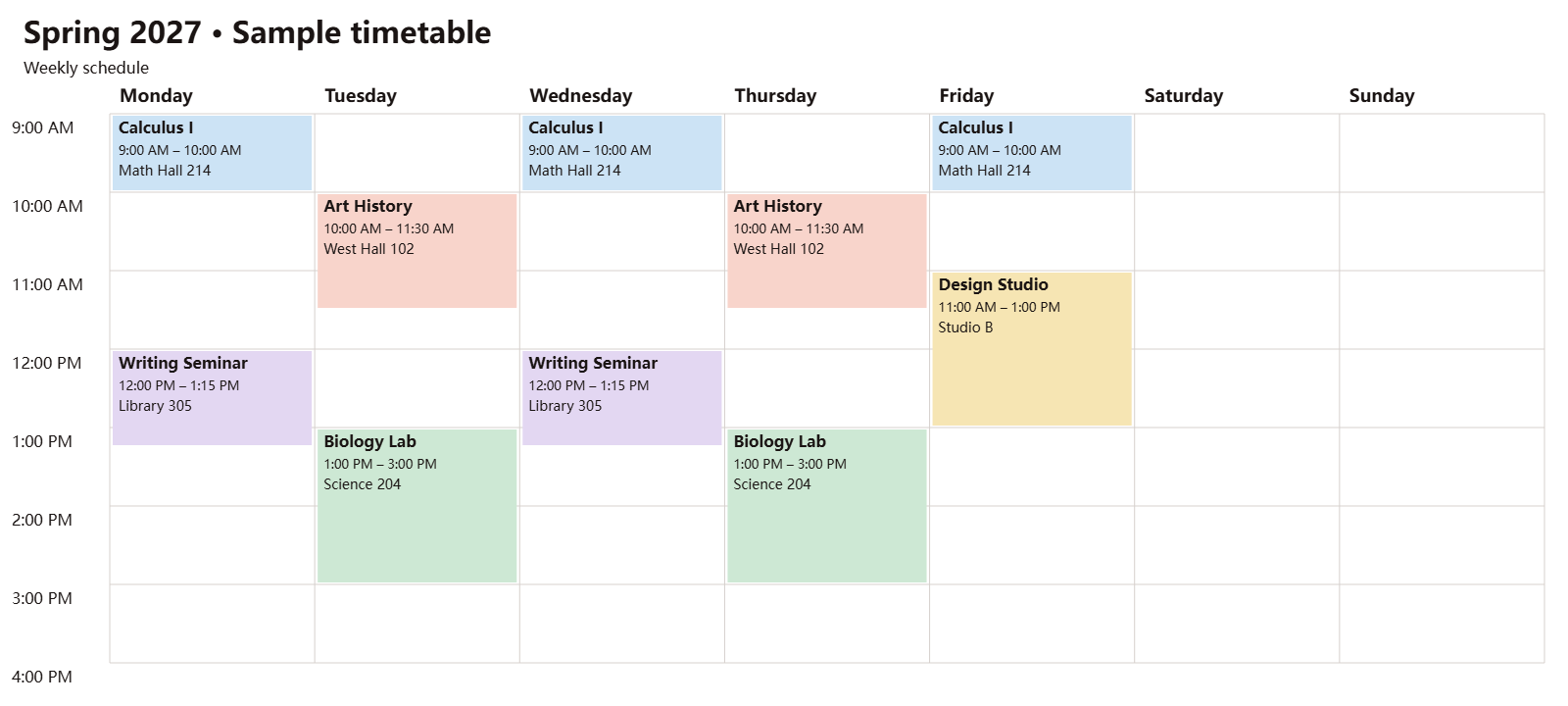
Spring 2027 • Sample timetable
Jan 11 – May 7, 2027
Swipe to see later weekdays.
No overlapping class times.
Set your semester
Choose the dates your classes meet and add any days off.
Preview and export
Download ICS exports the whole semester in your campus time zone. Use the week preview to check individual dates.
Check meeting dates by week
- Calculus I9:00 AM–10:00 AM
- Writing Seminar12:00 PM–1:15 PM
- Art History10:00 AM–11:30 AM
- Biology Lab1:00 PM–3:00 PM
- Calculus I9:00 AM–10:00 AM
- Writing Seminar12:00 PM–1:15 PM
- Art History10:00 AM–11:30 AM
- Biology Lab1:00 PM–3:00 PM
- Calculus I9:00 AM–10:00 AM
- Design Studio11:00 AM–1:00 PM
Use the weekly PDF for printing or the PNG for sharing.
How to use the class schedule maker
Add lectures, labs and discussions
Choose Start my schedule or select Add class in your existing draft. Enter the class name, meeting days, hours and room if you know it. Use separate entries for a lecture and lab with different times or locations.
Check your weekly timetable
Look for outlined blocks that sit side by side on the same day. Select a block to edit the class and see whether another section fits.
Choose a format to export
For a printable class schedule, download the weekly PDF. To add dated meetings to a calendar app, set your semester dates and breaks, review the meeting preview, then select Download ICS.
Check class conflicts before registration
Build a draft from your school's course listings. Include every required meeting for each course, especially labs and discussion sections. If a Tuesday lecture runs from 10 to 11 a.m. and a lab starts at 10:45 a.m. that day, the planner highlights both blocks. Move the lab to an available section in your draft and check the rest of the week again.
A class that starts when another ends fits on the grid. Check whether you can actually get from one room to the next, especially if the classes are on different campuses. Save a PDF of the version you prefer, then use your school's registration portal to confirm section availability and enroll.
Can I add my class schedule to Google Calendar and skip spring break?
Yes. Enter the first and last teaching dates under Set your semester, choose your campus time zone, and add spring break under Breaks and days off. Check the dated preview, then download the ICS file and import it into Google Calendar on a computer. The file includes each class meeting outside the break.
Try it with the Spring 2027 sample. Choose Try example if your own schedule is open, and select Reset example if you edited the sample. Under Check meeting dates by week, select March 8 to see the 10 meetings skipped for spring break or March 15 to see classes resume. PDF and PNG show a regular teaching week.
Add your class schedule to your calendar
After importing, check the first teaching week and a week after a break or a clock change. If the times look different, check the display time zone in your calendar app. A class at 9 a.m. in New York appears at 6 a.m. when the app displays Los Angeles time.
Keep the imported meetings in a separate term calendar so you can replace them together. If a room or section changes, edit the affected meetings in your calendar app or replace the old term calendar before importing a fresh file. An ICS download is a snapshot of your plan.
If your school already provides an ICS file, open the ICS preview and Google Calendar import guide to review its events and follow the import steps.
Frequently asked questions
Is this class schedule maker free?
Yes. Create a timetable, check time conflicts, and download PDF, PNG, or ICS without an account or a watermark.
Can I put my Monday and Wednesday lecture and Friday lab on the same schedule?
Yes. Select Monday and Wednesday in one lecture entry if the hours and room are the same. Add a separate Friday entry for the lab so its hours and room appear correctly on the weekly timetable and in the calendar.
Why do back-to-back classes show no time conflict?
The planner flags classes that share time on the same day. When one class ends at the exact time the next begins, neither is marked as overlapping. Check the room locations yourself so you can allow time to walk between buildings.
Can I skip just one holiday?
Yes. In Breaks and days off, enter the holiday as both the first and last day. The weekly timetable still shows your usual class hours. The ICS file leaves out every meeting on that date.
Can I put my class schedule on my phone?
To see dated meetings in the Google Calendar app, import ICS on a computer, then open the app with the same account and turn on the term calendar. To keep the whole week as a picture, use Download PNG and save the image on your phone.
Can I print my class timetable?
Yes. Open the landscape PDF in your PDF viewer and choose Print. The PDF shows a typical week with class names, meeting hours and room labels where they fit. Use the dated calendar for exceptions such as holidays.
Where is my schedule saved?
Start my schedule saves one personal draft in this browser. Clearing your browser data removes it. You can try the fictional example and return to your draft. The planner generates downloads on your device.