Upload the timetable
Use a screenshot, photo, or PDF that includes weekday and term context.
Convert a class timetable, course schedule, or school notice into editable events. Review rooms, weekly patterns, and term dates before importing the schedule.
Checking available credits…
Review each course independently, including the room and the final recurrence date.
These fictional source schedules and event previews match the prepared reference ICS below. A new AI conversion may need corrections.
Readable source example
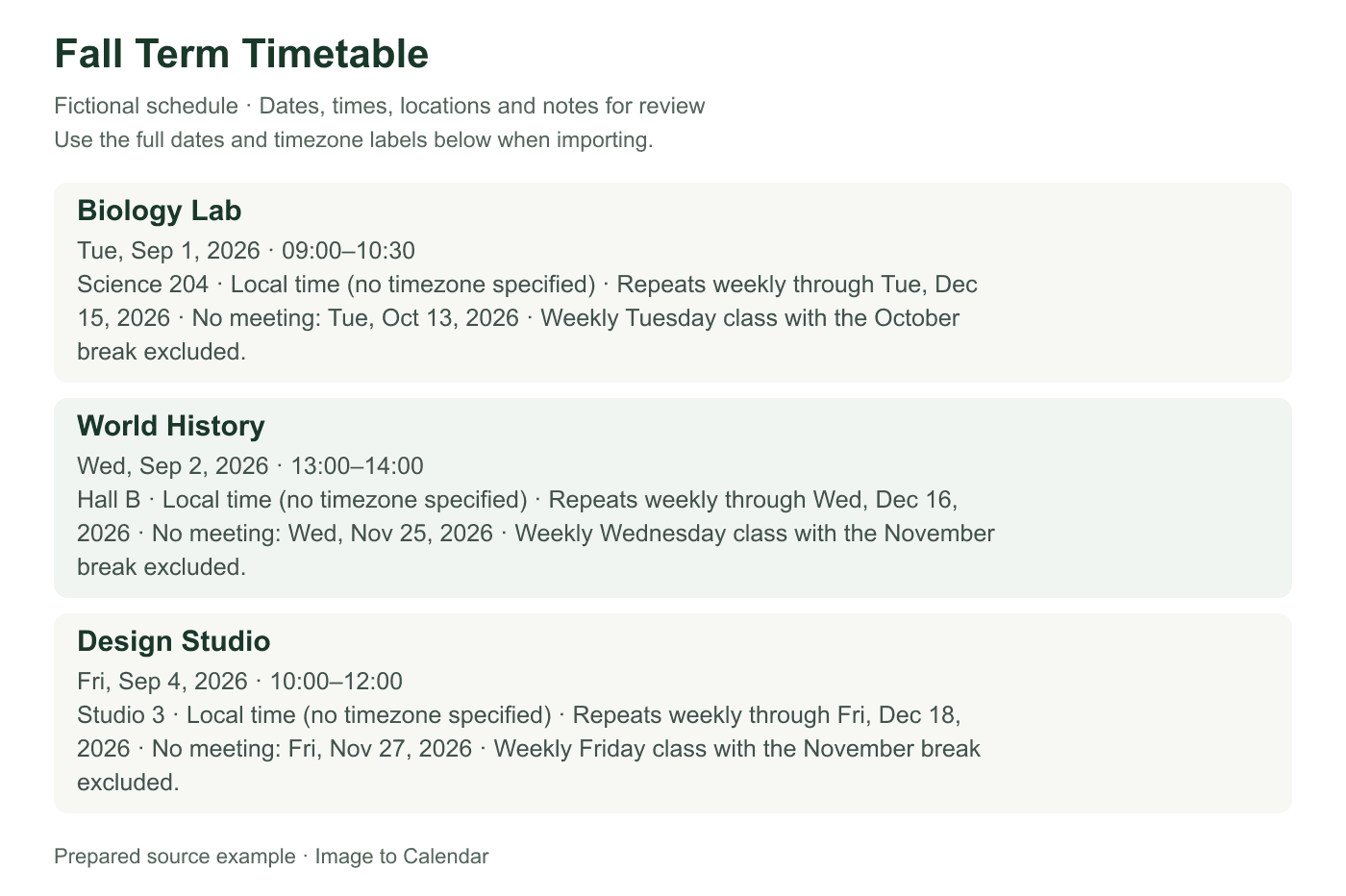
Verifiable example
This example separates the first class date, weekly pattern, term end date, and a skipped holiday. Those values should be independently reviewable before one recurrence rule is exported.
| Course | Weekly time | Room | First class | Repeat until | Skipped date |
|---|---|---|---|---|---|
| Biology Lab | Tuesday · 9:00–10:30 AM | Science 204 | Sep 1, 2026 | Dec 15, 2026 | Oct 13 break |
| World History | Wednesday · 1:00–2:00 PM | Hall B | Sep 2, 2026 | Dec 16, 2026 | Nov 25 break |
| Design Studio | Friday · 10:00 AM–12:00 PM | Studio 3 | Sep 4, 2026 | Dec 18, 2026 | Nov 27 break |
| Source detail | Calendar field | Review question |
|---|---|---|
| Tue 09:00–10:30 | Start, end, weekly Tuesday recurrence | Does the first Tuesday match the term calendar? |
| Through Dec 15 | Recurrence end | Is the final occurrence included? |
| No class Oct 13 | Excluded occurrence | Is the break date removed without ending the series? |
| Science 204 | Location | Does the room change later in the term? |
Use a screenshot, photo, or PDF that includes weekday and term context.
Check rooms, timezone, weekly recurrence, and the last date of the term.
Download one ICS file for the courses you want in your calendar.
Academic schedules often depend on legends or term rules outside the main grid.
A weekday alone is not enough; verify when the first class actually occurs.
Add an until date to weekly events so classes do not repeat after the course ends.
Holidays, exam weeks, alternating weeks, and room changes may need manual edits.
A timetable is compact because students already understand its term dates, week patterns, room codes, and exceptions. A useful calendar expands that hidden context into events that stop and change at the right time.
Make sure the source includes course names, weekdays, times, and the academic period it covers. A timetable screenshot that says Monday and Wednesday is incomplete without the date of the first teaching week. Keep the term calendar, legend, or accompanying notice visible when it explains abbreviations such as MWF, Week A, Lab, or Tutorial. If several cohorts appear in one grid, identify the row or color that belongs to you before export.
Review each course as its own event. Confirm that lectures, laboratories, seminars, and tutorials with similar names have the correct duration and room. Preserve a useful course code in the title when it helps distinguish sections, but avoid copying administrative text that does not help on the day. Notes can hold an instructor name, preparation reminder, online link, or building directions without making the calendar title difficult to scan.
A weekly class needs more than a weekday and time. Set the actual first meeting date, the correct weekdays, the local timezone, and an until date at the end of teaching. Without a recurrence end, the class can continue into the next term. If Monday and Wednesday sessions have different rooms or durations, create separate recurring events rather than forcing both into one rule that hides the difference.
Use Set up a semester in the review screen to confirm the first teaching week, term end, and timezone. Add holiday periods, then select Apply semester rules to exclude those dates from weekly courses before download. Individual courses can allow classes during a holiday or use alternating weeks. Review irregular room or time changes separately, and adjust anything the schedule cannot express after import.
Put the building and room in the location field so the event works with search and navigation. If a class is online, use a clear location such as Online and keep the approved meeting link in the notes. Hybrid courses may change location by week; represent those sessions separately when the source provides exact dates. Do not assume that a room code is an address unless the institution’s schedule explains it.
A timetable normally lists teaching time, not the time needed to cross campus, park, or prepare. Keep the official start and end times accurate, then add personal travel or study blocks separately in your calendar if needed. This preserves the source schedule while allowing a realistic day plan. Check back-to-back classes for timezone or AM/PM mistakes, especially when one event suddenly appears to overlap every other course.
Select only the classes you intend to attend and download one ICS file. A dedicated term calendar is useful because it can be hidden during breaks and removed when the term ends. Import once, then spot-check the first week, a week near a holiday, and the final teaching week. Open at least one recurring event to confirm its weekdays, room, duration, timezone, and recurrence end.
The file is a snapshot of the timetable, not a connection to the school system. Room moves, cancelled sessions, revised teaching weeks, and exam announcements will not update automatically. Edit isolated changes directly or create a new reviewed export for a major revision, taking care to remove the obsolete batch first. The uploaded timetable is not permanently stored by this app, but cropping unrelated student names or private information remains a sensible precaution.
A teaching timetable does not always include exams, assignment deadlines, office hours, or enrolment dates. Add those only when they are visible in the uploaded source or verified from an official notice. Exams should usually be separate events with their own venue, seat or candidate notes, and arrival expectations rather than exceptions inside a weekly class recurrence. Deadlines may work as all-day events or timed reminders depending on the institution’s exact submission rule.
When several academic sources cover the same term, convert and label them in logical groups instead of merging everything blindly. Import the weekly timetable first, then add reviewed exam or deadline events while watching for duplicates. Keep personal study sessions outside the official schedule batch so they can change without obscuring source accuracy. This separation gives the calendar a clear distinction between what the institution published and the planning choices you make for yourself.
Nothing is sent to your calendar until you have checked the extracted result.
Yes. Each detected class can be reviewed as a separate event before export.
Yes. You can review or set weekly recurrence, selected weekdays, and an optional end date.
Yes. Visible rooms or classroom locations can be extracted into the event location field.
Before downloading, open Set up a semester, add holiday periods, and select Apply semester rules. Weekly courses skip those dates unless you allow holiday classes for a course. Review any remaining irregular changes after import.