Upload the official timetable
Use the latest published image or PDF and keep headers that identify the exam period, timezone, and revision.
Upload an exam timetable, registrar PDF, or schedule screenshot. Turn confirmed assessments into editable one-off events while keeping TBD details and private candidate information under review.
Checking available credits…
A registrar timetable can mix final appointments with rows whose room or time is still awaiting confirmation.
These fictional source schedules and event previews match the prepared reference ICS below. A new AI conversion may need corrections.
Readable source example
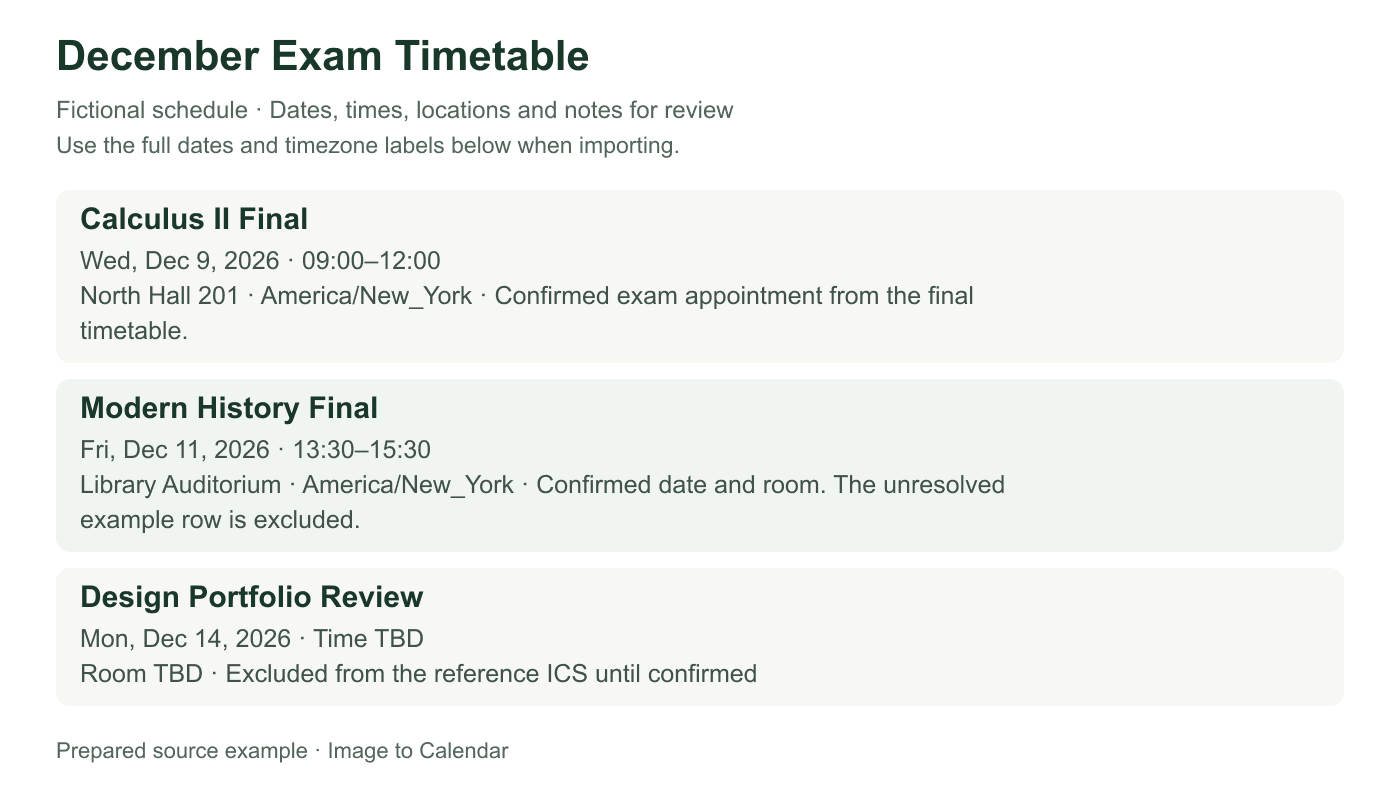
Verifiable example
The table demonstrates the evidence required for a final event and the reason a TBD row should not receive an invented appointment time.
| Assessment | Published status | Calendar action | Critical check |
|---|---|---|---|
| Calculus II Final | Confirmed | Export timed event | Full course code and room |
| Modern History Final | Confirmed | Export timed event | Date, duration, and campus |
| Design Portfolio Review | Time TBD | Leave out of sample ICS | Wait for an official time |
Use the latest published image or PDF and keep headers that identify the exam period, timezone, and revision.
Match the course or exam code to its date, start, duration, room, delivery mode, and confirmation status.
Exclude unresolved rows when necessary, then download a focused ICS file for the exam period.
A small reading error can put an exam on the wrong day or in the wrong building, so every row needs direct comparison.
Confirm the full course or exam code instead of relying on a similar subject title or truncated row.
TBD, provisional, deferred, and supplementary describe different levels of certainty and must not be erased.
Crop candidate numbers, accommodation notes, and other students' assignments when they are not needed to identify your exam.
Examinations are usually one-off, high-consequence events. The safest workflow favors exact source matching and visible uncertainty over aggressive automation.
Begin with the most recent official schedule. Registrar timetables can change after an initial or provisional release, and screenshots forwarded through a group chat may omit the revision date. Keep the document title, academic term, publication date, and any banner that says final or provisional. If two versions disagree, resolve the conflict with the issuing institution before adding events rather than choosing the later-looking file by filename alone.
The exam period supplies context that individual rows may not repeat. A column headed Monday 14 December can contain several times underneath it, while the year appears only at the top of the page. Include those headers in the upload and compare every extracted date against them. Numeric dates also require locale awareness: 05/06 may represent different days depending on the institution, so use semester context and an unambiguous official reference.
Similar course names can have different assessments for different sections, campuses, or modes of study. Use the complete course code and section when it is available, then choose a readable event title that still distinguishes the assessment in your calendar. Do not select a row merely because the subject name looks familiar. Compare the instructor, section, campus, or exam group only where the source uses those details to establish the correct appointment.
Delivery mode affects both location and preparation. An in-person exam needs a building and room, a remote proctored assessment may need a platform note, and a take-home paper may be defined by an availability window and submission cutoff. Preserve the mode without copying access credentials into the event. If the schedule assigns rooms by surname or candidate range, keep only the branch that applies to you and avoid exporting other students' identifiers.
Some timetables publish a start and finish, while others provide a start plus a duration. Confirm the resulting end time instead of assuming every exam lasts the same number of hours. Include reading time only when the official schedule includes it in the appointment boundary. For evening or remote assessments that cross midnight, the end belongs to the following date; a same-date end earlier than the start is a warning that the boundary needs correction.
Timezones matter for distance programs and centrally scheduled online exams. A source can publish all times in the institution's timezone even when the student is elsewhere. Keep that named zone in the calendar event, then inspect how the destination app displays it in your local zone. Avoid manually shifting the clock and changing the timezone at the same time, which applies the conversion twice and creates a misleading appointment.
A pending time or room is meaningful information, not an invitation to fill the blank. If the date is confirmed but the time is TBD, you can retain a clearly labeled provisional all-day note or leave the row out of the export until the timetable is updated. Never use the normal class time as a substitute unless the official exam instructions say to do so. Apply the same caution to rooms marked TBA and exams awaiting approval.
Deferred, resit, and supplementary schedules often resemble the main timetable while applying to a smaller group. Their dates should not be combined into one event or imported speculatively. Select the applicable sitting and preserve its status in the title or notes. When confirmation arrives, edit that event rather than creating another row with nearly the same course name. Clear status language reduces the chance of following an obsolete appointment.
Import exams into a separate calendar when possible. A dedicated calendar makes the full period easy to inspect, share only when appropriate, and replace if the institution publishes a comprehensive revision. After import, compare the earliest exam, the latest exam, and every unusual row with the source. Check date, start, end, timezone, room, and delivery mode; reminders can then be configured inside the destination calendar according to your study plan.
The downloaded ICS remains a static snapshot. Monitor the official timetable and update changes deliberately, especially during severe weather, room reallocation, or deferred assessment periods. Uploaded files are processed for the conversion request and are not permanently stored by this application, but exam documents may contain sensitive allocations. Crop or redact unrelated candidate data before upload and keep the resulting calendar private unless sharing is genuinely necessary.
Nothing is sent to your calendar until you have checked the extracted result.
Yes. Keep the period header, year, timezone, and full row boundaries visible, then verify every extracted assessment before export.
Do not invent a time. Keep the uncertainty visible or leave the event unselected until the institution confirms it.
Yes. Review the published timezone and inspect the imported event in your destination calendar before relying on the local display.
The uploaded file is not permanently stored by this app, but you should still crop candidate numbers and unrelated private allocations before uploading.