Upload the complete syllabus
Include pages that define the term dates, weekly meetings, assessment calendar, timezone, and exception weeks.
Upload a course syllabus and collect the dated work that is scattered across its schedule, policies, and assessment sections. Edit lecture patterns and one-off deadlines before exporting the semester.
Checking available credits…
Lectures, graded work, and exams need different calendar treatment even when they originate in the same document.
These fictional source schedules and event previews match the prepared reference ICS below. A new AI conversion may need corrections.
Readable source example
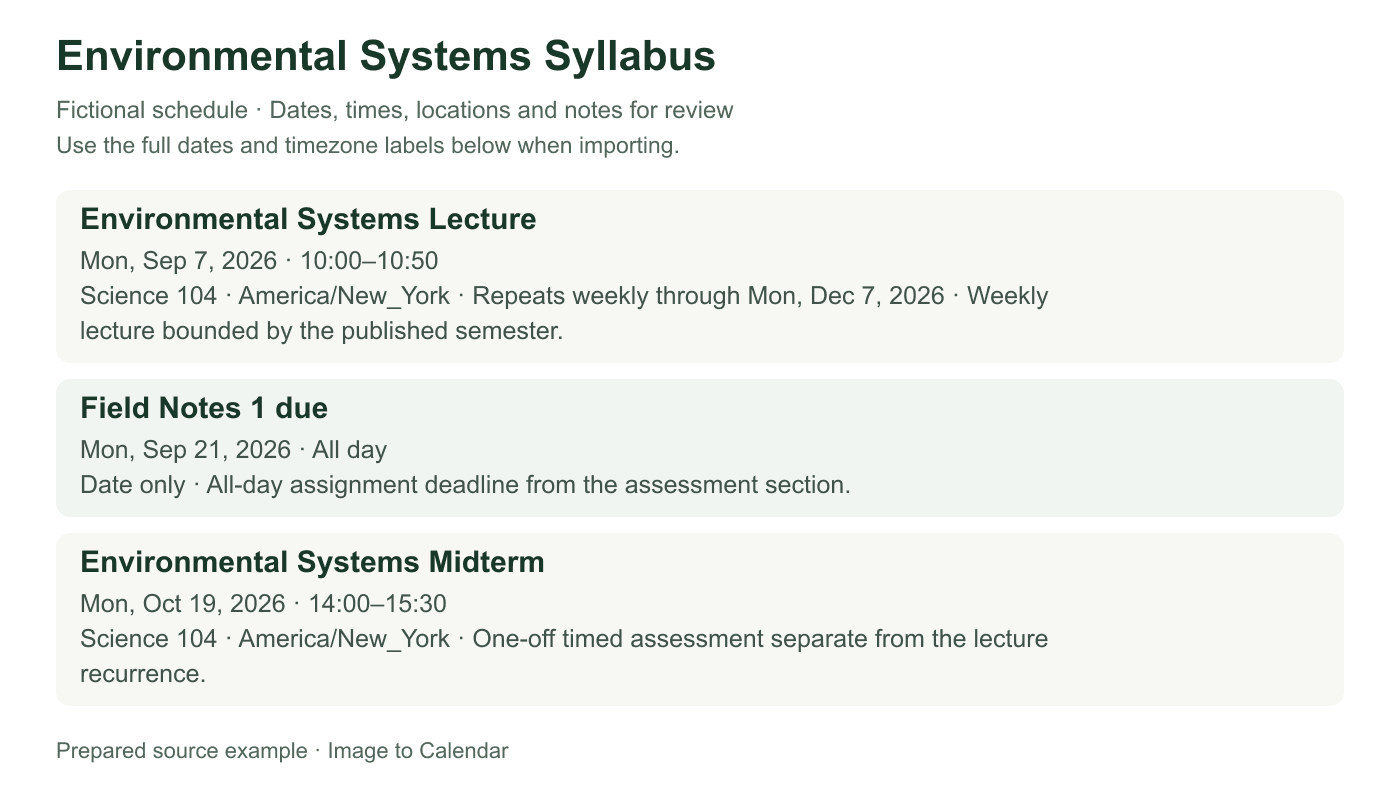
Verifiable example
A syllabus needs more than one event model. The sample distinguishes a bounded lecture series from a due date and a timed midterm.
| Source item | Calendar representation | Boundary | Review focus |
|---|---|---|---|
| Monday lecture | Weekly recurring event | Sep 7 through Dec 7 | Reading week and term end |
| Field Notes 1 | All-day deadline | Sep 21 | Due-time language and submission zone |
| Midterm | One timed event | Oct 19 · 14:00–15:30 | Room and official assessment time |
| Change | Safe action | Avoid |
|---|---|---|
| One assignment moves | Edit that deadline | Re-importing the whole course |
| Lecture room changes | Update the affected series or date | Keeping two conflicting room entries |
| Final remains unconfirmed | Wait for the registrar schedule | Inventing a time from the usual class |
Include pages that define the term dates, weekly meetings, assessment calendar, timezone, and exception weeks.
Separate recurring lectures from assignment deadlines, readings, presentations, office hours, midterms, and the final.
Correct dates and repeat limits, select the work you need, and download a course-specific ICS file.
Course documents often define dates in one section and explain their meaning somewhere else.
Keep term start, reading week, holidays, and final-exam boundaries when they change a recurring lecture pattern.
A paper due before class differs from an all-day deadline, and an online portal may publish a specific timezone.
Draft topics and dates marked subject to change should remain identifiable instead of appearing as confirmed commitments.
A syllabus is both a schedule and a policy document. Reliable conversion requires matching each date to its academic purpose instead of treating every number as an appointment.
The obvious schedule grid is only one source of calendar information. Assignment descriptions may contain due dates that do not appear in the week-by-week outline, while attendance policies can identify holidays, make-up meetings, or the final withdrawal date. Scan the complete permitted page range and keep headings that explain whether a date belongs to a lecture, submission, assessment, presentation, lab, or administrative action. A date without its label is not ready to become an event.
Syllabi also refer to relative timing, such as ‘submit before the next class’ or ‘present during week six.’ Those phrases may require the term calendar and weekly meeting pattern to resolve. Do not turn an unresolved reference into a confident date. Keep the uncertainty visible, add a conservative note, or omit the row until the instructor provides a specific value. The review step exists to prevent a plausible interpretation from silently becoming an academic deadline.
Regular lectures and labs are good candidates for recurrence when the syllabus gives a clear first meeting, weekday, time, room, and term boundary. A course that meets Monday and Wednesday can use one weekly pattern with both weekdays, but a separate Friday lab may deserve its own series. Confirm whether the published ending date includes examinations, whether reading week interrupts meetings, and whether a laboratory begins later than the main lecture.
Not every course follows a uniform semester. Intensive modules, alternating seminars, rotating discussion groups, and compressed summer sessions can change time or location midway through the term. Split these phases into separate series instead of forcing one rule to represent incompatible patterns. Review the first and final instance of every series and inspect known holiday exceptions so a recurring lecture does not appear on a day when the campus is closed.
Assignments usually need task-oriented titles rather than the name of the course alone. Include the deliverable, such as ‘Lab report 2 due,’ and place submission instructions or the relevant module in notes. When the syllabus publishes a precise cutoff, preserve the time and timezone; when it states only a date, an all-day event avoids inventing an arbitrary hour. Readings can be included when the document assigns them to a specific meeting or deadline, but a long bibliography should not become dozens of unscheduled events.
Milestones for a larger project may each deserve an entry: topic approval, proposal, draft, presentation, and final submission are different actions. Keep those steps separate while retaining a consistent project name. If the learning platform later changes a deadline, update the event that changed rather than importing the entire syllabus again. A downloaded calendar is a planning snapshot, while the current instructor announcement remains the authoritative source.
Assessments require more caution than ordinary meetings because their times and rooms may be published in different places. A syllabus can give the midterm date but defer the final to a registrar schedule. Create a confirmed timed event only for details that are actually available. Keep ‘time to be announced’ in the notes or leave the event unselected until the official timetable resolves it; do not substitute the usual lecture time unless the document says the exam occurs during class.
Check whether an assessment is online, take-home, or open across a window. A 48-hour take-home exam may need a start and a submission deadline, whereas an in-person final is one timed appointment with a room. Preserve preparation instructions only when they help attendance, and avoid including personal accommodations or student identifiers in a shared calendar. Those details can be managed privately after the general event has been imported.
Many syllabi explicitly reserve the right to change dates. Give the exported calendar a course-specific name so that its entries are easy to audit. After import, compare the first lecture, one deadline, the midterm, and the final with the original document. If the course releases a revised schedule, identify the affected rows and edit them directly. Re-importing every event can duplicate unchanged lectures and make it harder to know which version is current.
Use separate calendars when processing several courses so each schedule can be hidden, replaced, or removed without disturbing the others. Keep source files long enough to complete the verification, but avoid uploading documents that contain unrelated student records or private feedback. The converter processes the selected file for the request and does not permanently store its content; careful source selection still reduces unnecessary exposure and keeps the review focused.
Nothing is sent to your calendar until you have checked the extracted result.
A timetable mainly describes recurring meeting times. A syllabus also contains assignments, readings, projects, exams, exceptions, and policy dates.
Yes, within the PDF page and file-size limits. Keep the pages that explain term dates, assessment labels, and schedule exceptions.
The imported file does not update automatically. Edit the affected calendar event after checking the latest official course announcement.
Yes. Give each export a recognizable course name and choose or create the destination calendar during import.