Pitman Schedule Calendar & ICS Generator
Build a free, full-year Pitman schedule calendar (2-2-3 rotation) for Fixed or Rotating Squads A–D. Preview 12 months, calculate biweekly hours and overtime, and download an ICS calendar, CSV template, or printable sheet.
Configure your Pitman schedule
PresetsSquad A · Fixed 14-day
January 2027
- Day shift
- Night shift
- Off
Day shift · 06:00–18:00 · 12h
Ready-to-use Pitman schedule examples
Load a proven 12-hour Pitman configuration into the generator above to inspect every shift, swap individual dates, or export the full year as ICS or CSV.
14-Day Pitman Schedule Chart & 4-Squad Roster
In a fixed Pitman schedule, Squads A and B cover every day shift while Squads C and D cover every night shift. Each squad works 7 twelve-hour shifts (84 hours) per 14-day cycle with every other Friday–Sunday off.
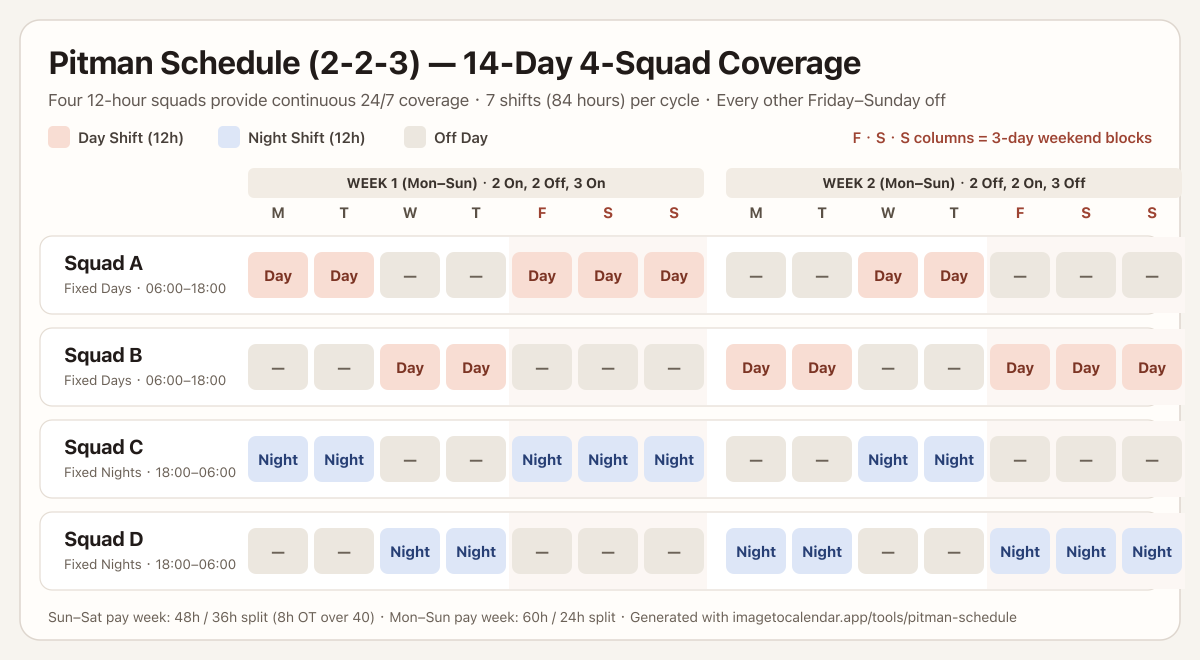
Scroll horizontally on smaller screens to inspect all 14 days.
| Squad | Mon | Tue | Wed | Thu | Fri | Sat | Sun | Mon | Tue | Wed | Thu | Fri | Sat | Sun | Cycle |
|---|---|---|---|---|---|---|---|---|---|---|---|---|---|---|---|
| Squad AFixed Days · Wk 2 off | 84h | ||||||||||||||
| Squad BFixed Days · Wk 1 off | 84h | ||||||||||||||
| Squad CFixed Nights · Wk 2 off | 84h | ||||||||||||||
| Squad DFixed Nights · Wk 1 off | 84h |
Already have your department’s PDF or photo roster?
Upload a published schedule with court dates, training blocks, or holiday swaps already marked to extract every shift into one ICS file.
How the Pitman schedule works (2-2-3 pattern)
The Pitman schedule (also called the 2-2-3 shift pattern) gives police, 911 dispatch, EMS, hospitals, and 24/7 plants uninterrupted coverage while capping stretches at three consecutive shifts:
- Week 1 (2 on, 2 off, 3 on): Squad A works Mon–Tue, rests Wed–Thu, and works Fri–Sun.
- Week 2 (2 off, 2 on, 3 off): Squad A rests Mon–Tue, works Wed–Thu, and enjoys a 3-day weekend Fri–Sun.
- Zero-gap handoff: Squad B works Squad A’s exact inverse on days; Squads C and D mirror A and B overnight.
Pitman schedule pros and cons: sleep and work-life balance
Teams adopting a Pitman schedule calendar generally compare recovery time against 12-hour shift length:
- Pros: Max 3 shifts in a row, 26 guaranteed 3-day weekends per year, and roughly half the year off (~182–183 workdays per year).
- Cons: 12-hour shifts leave little weekday evening time for commuting or family routines, and 2-week day/night flips cause recurring circadian fatigue.
- Recommendation: Favor a fixed Pitman schedule with night differential pay for sleep health, or rotate every 4 weeks (56-day cycle) instead of biweekly.
Pitman schedule hours, overtime, and payroll workarounds
A standard 12-hour Pitman schedule totals 84 hours per 14-day cycle (42 hours/week average). Your payroll week cutoff directly controls weekly overtime:
- Sun–Sat pay week (48h / 36h): Produces 8 hours over 40 per biweekly pay period.
- Mon–Sun pay week (60h / 24h): Clusters 5 shifts into Week 1, triggering 20 hours over 40.
- Mid-shift payroll split (42h / 42h): Setting the pay-week cutoff at midday splits one boundary shift (6h + 6h), cutting overtime to 4 hours biweekly.
- 8-hour short day or FLSA Section 7(k): Shortening one shift to 8 hours yields an 80-hour pay period. Sworn police and fire agencies can also apply FLSA Section 7(k) (U.S. DOL Fact Sheet #8), raising statutory overtime thresholds to 86 hours in 14 days (or 171 hours in 28 days).
How many employees do you need for a 24/7 Pitman schedule?
Staffing one 24/7 seat requires a strict minimum of 4 employees (Squads A, B, C, and D)—so 3 seats per shift require 12 baseline staff. Factoring in a typical 15%–20% relief allowance for PTO, sick leave, and training brings real-world headcount to 4.6–4.8 FTEs per 24/7 post.
Pitman schedule vs. Panama, DuPont, and 4-on / 4-off
| Pattern | Cycle | Max in a Row | Day / Night | Weekends |
|---|---|---|---|---|
| Pitman Schedule (Fixed) | 14 days | 3 shifts | Fixed days (A/B) & nights (C/D) | Every other 3-day weekend (26/yr) |
| Rotating Pitman / Panama | 28 / 56 days | 3 shifts | Flips day ↔ night every 2–4 weeks | Every other 3-day weekend (26/yr) |
| DuPont Schedule | 28 days | 4 shifts | Rotates days & nights monthly | One 7-day stretch off per month |
| 4-on / 4-off Schedule | 8 days | 4 shifts | Fixed or 2 days + 2 nights | Drifts across weekdays |
Need a 4-on/4-off or custom rotation? Try our Shift Calendar Generator, or use the Firefighter Shift Calendar for 24/48 and 48/96 platoons.
How to import your Pitman schedule into Google, Apple, or Outlook
Click Download ICS above to save your shifts into one file, then import into a dedicated “Work Shifts” calendar:
- Google Calendar: Settings → Import & export (Google Calendar guide) or preview first in Import ICS to Google Calendar.
- Apple Calendar: Mac File → Import (Apple Calendar guide); on iPhone, AirDrop or email the
.icsfile and tap Add All. - Outlook: Calendar → Add calendar → Upload from file (Outlook import guide).
Prefer spreadsheets? Click CSV Template above, or convert any ICS file with our ICS to Excel Converter.
Pitman schedule FAQ
What is the Pitman schedule (2-2-3 shift pattern)?
It is a 14-day, 12-hour rotation covering 24/7 operations with four squads (A–D). Each squad works 2 on, 2 off, 3 on in Week 1, then 2 off, 2 on, 3 off in Week 2—never more than three shifts in a row and every other Friday–Sunday off.
How is a Pitman schedule different from a Panama schedule?
Both share the identical 2-2-3 work/off cadence. Agencies typically use “Pitman” for fixed day/night squads (A & B on days, C & D on nights) and “Panama” when crews flip between days and nights every 2 or 4 weeks. Our tool generates all three.
How do I align Squad A, B, C, or D with my department roster?
Pick your rotation type and squad, then set Cycle Week 1 Monday to a Monday when Squad A works Mon–Tue and Fri–Sun. Verify one workday and one weekend off in the Month or 4 Squads tab before exporting.
How does the ICS file handle overnight shifts and Daylight Saving Time?
Night shifts (such as 18:00–06:00) export as one continuous event ending the next morning in your work time zone, keeping local handover times accurate across spring-forward and fall-back clock changes.
Can I mark PTO or shift swaps before downloading?
Yes. Click any date in the Month view to switch that day to Day shift, Night shift, or Off. Overrides update your ICS and CSV downloads immediately—all locally in your browser with no account required.