Upload the season schedule
Choose an image or PDF that keeps dates, opponents, and venue notes visible.
Bring a season of games, practices, opponents, and locations into your calendar. Review the schedule first, then export the selected events in one ICS file.
Checking available credits…
Keep opponents, start times, and venues editable so each game can be checked against the source.
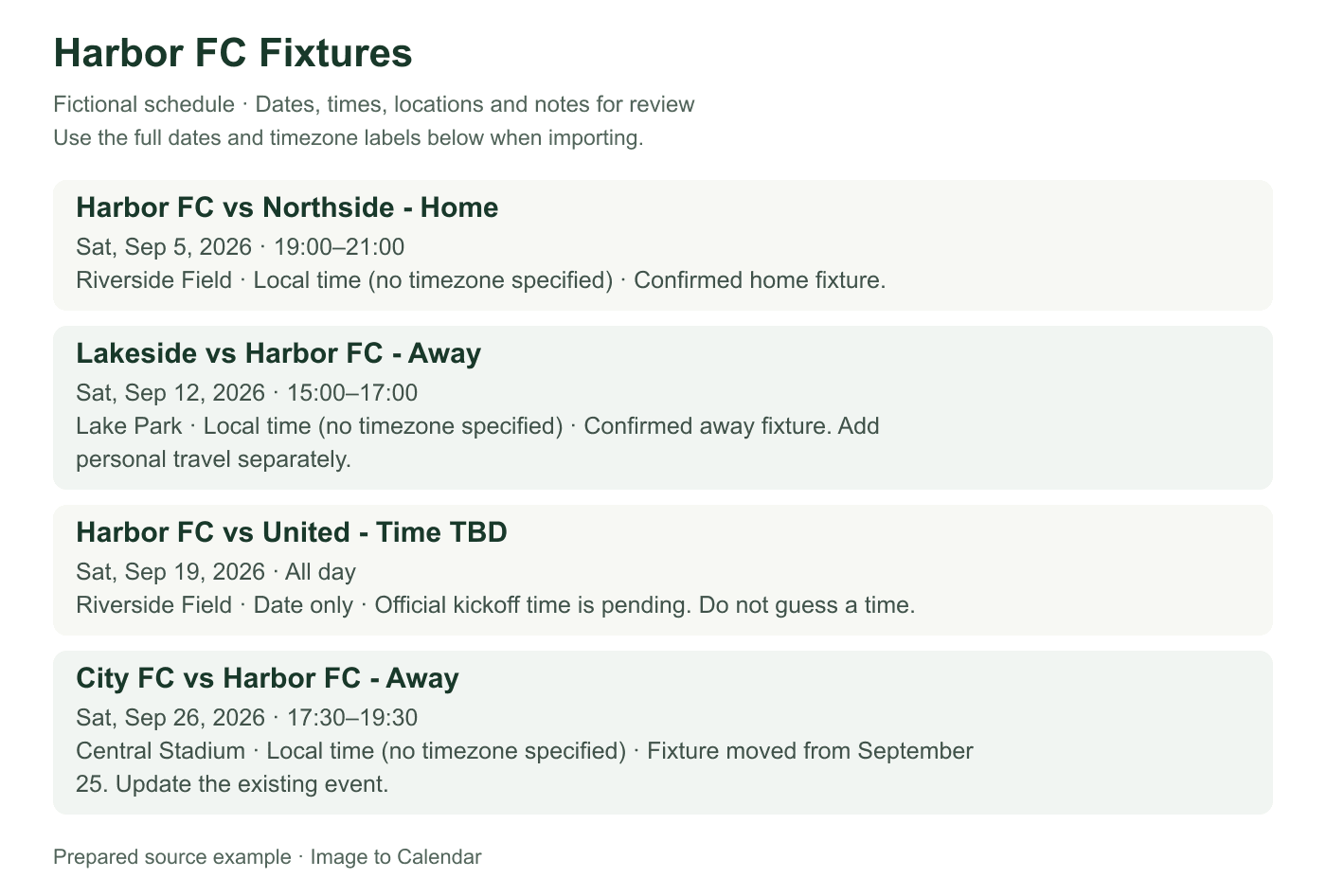
These fictional source schedules and event previews match the prepared reference ICS below. A new AI conversion may need corrections.
Readable source example
Verifiable example
A usable sports event needs more than an opponent and kickoff time. This example keeps the home or away role, venue, update status, and duplicate decision visible together.
| Date | Fixture | Role | Venue | Source status | Calendar action |
|---|---|---|---|---|---|
| Sep 5 · 7:00 PM | Harbor FC vs Northside | Home | Riverside Field | Confirmed | Import once |
| Sep 12 · 3:00 PM | Lakeside vs Harbor FC | Away | Lake Park | Confirmed | Add travel separately |
| Sep 19 · TBD | Harbor FC vs United | Home | Riverside Field | Time pending | Keep TBD in notes; do not invent a time |
| Sep 26 · 5:30 PM | City FC vs Harbor FC | Away | Central Stadium | Moved from Sep 25 | Edit the existing event instead of importing a duplicate |
| Change | Safe update | Avoid |
|---|---|---|
| Kickoff time changes | Edit the existing event after checking the official source | Re-importing the full season |
| Venue changes | Update location and travel plans | Creating a second fixture with the old venue |
| Game postponed | Mark or move the existing event once a new date is confirmed | Guessing a replacement date |
| New season file | Use an isolated calendar or remove the old batch first | Uploading both versions into the same calendar |
Choose an image or PDF that keeps dates, opponents, and venue notes visible.
Review home or away context, start time, timezone, location, and all-day settings.
Download the games and practices you want in one ICS file.
An imported calendar file is useful for the published schedule, but it is not a live league feed.
Add the venue or an away marker to the title or location when the source makes it clear.
Use all-day events only when the schedule truly omits a start time.
Rescheduled or canceled events need to be changed in your calendar after import.
Season lists compress opponents, home and away markers, venues, and provisional times into a small table. Expanding those details carefully produces calendar events that remain useful on game day.
Use a source that clearly identifies the team, season, age group, or competition. Clubs may publish several squads on the same page, so verify that every extracted row belongs to the intended team. Keep column headings and legends that explain game, practice, tournament, scrimmage, or meeting codes. Give each event a descriptive title such as Game vs Hawks or Practice rather than leaving only an opponent or unexplained abbreviation.
Select any combination of games and practices before export, but review them independently. Practices often repeat at one venue while games move between locations, and tournaments may span several days. A team dinner, registration deadline, or equipment pickup can be an all-day or timed event without pretending it is a game. Keeping event types clear makes the imported calendar easier for players and families to scan.
Home and away markers affect travel even when the opponent is the same. Put the confirmed venue or address in the location field and keep an Away marker in the title or notes when useful. Do not replace a missing venue with the home field merely because the team is listed first. If the schedule provides only a facility name, add an address later from an official source rather than guessing during conversion.
For tournaments, check whether a listed time is the first game, check-in, warm-up, or the entire competition window. Multiple games on one day should usually be separate events when their times and opponents are known. Add useful arrival instructions in notes while preserving the official game time. Personal travel buffers and reminders can then be configured in the destination calendar without changing the published schedule data.
A date marked TBD does not become accurate just because a calendar requires a time. Keep it as an all-day placeholder only when that representation is useful, and label the uncertainty in the title or notes. When the official start time arrives, update the calendar event. Similarly, distinguish a postponed game from a cancelled game; moving the old event without checking the new venue can preserve outdated information.
League schedules change because of weather, facility availability, broadcast decisions, or tournament progression. An ICS file created from an image is not a live league feed and cannot receive those updates. Keep following the official team channel. Edit a few changed games directly, or generate a new reviewed batch for a major revision after removing or isolating the earlier events to prevent duplicates.
Import into a dedicated team calendar when practical. It can be shared under your destination app’s controls, hidden outside the season, and removed without affecting personal events. After import, inspect the opening game, an away event, a practice, and the final scheduled game. Confirm dates, local times, timezone, opponent, venue, all-day status, and any recurrence applied to practices.
For travel across timezones, verify whether the published schedule uses venue time or the team’s home time. Overnight tournaments may need separate travel and lodging events that are not part of the source. The uploaded schedule is processed for the conversion request and is not permanently stored by this app. Still, prefer a public team schedule or crop unrelated player information when a roster and fixture list appear together.
The team schedule should preserve the published game or practice time. Add your own arrival target, transport, meal, equipment, or volunteer reminders separately so they can change without altering the official event. Parents and players may need different preparation windows even when they share the same game calendar. For an away tournament, travel and lodging blocks can surround the reviewed fixture events without pretending those plans came from the uploaded source.
Share the destination calendar only through the controls of the calendar app you trust, and check whether it contains private locations or youth-team details. A public fixture list and a roster with player information have different privacy expectations. The converter does not invite teammates or publish the file. It gives you a reviewed ICS snapshot; you decide where to import it, which reminders to add, and whether the resulting calendar should remain private or be shared with an appropriate group.
Nothing is sent to your calendar until you have checked the extracted result.
Yes, provided the schedule is readable and remains within the limit of 100 events per conversion.
Yes. Visible venues or addresses can be reviewed in the event location field.
The imported ICS file does not update automatically. Change the event in your calendar when the official schedule changes.
Yes. Select any combination of extracted events before downloading the ICS file.