Weekly team meeting
Mondays, 09:00–09:30 in New York. Eight meetings, one file.
Create an ICS file from the event details you enter. Set dates, times, a timezone, and optional recurrence, then preview and download your calendar file—all on this page. Free to use, with no account required.
Fill in your event or try an example below. Preview and download the result right here.
Choose a date
09:00–10:00 · UTC
Choose an example, update its dates and details, and create your calendar file.
Mondays, 09:00–09:30 in New York. Eight meetings, one file.
October 12–13, 2026. Both days are included.
The 15th, 14:00–15:00 in London. Six occurrences.
Need your calendar events in a spreadsheet? Convert an ICS file to CSV locally for Excel or Google Sheets.
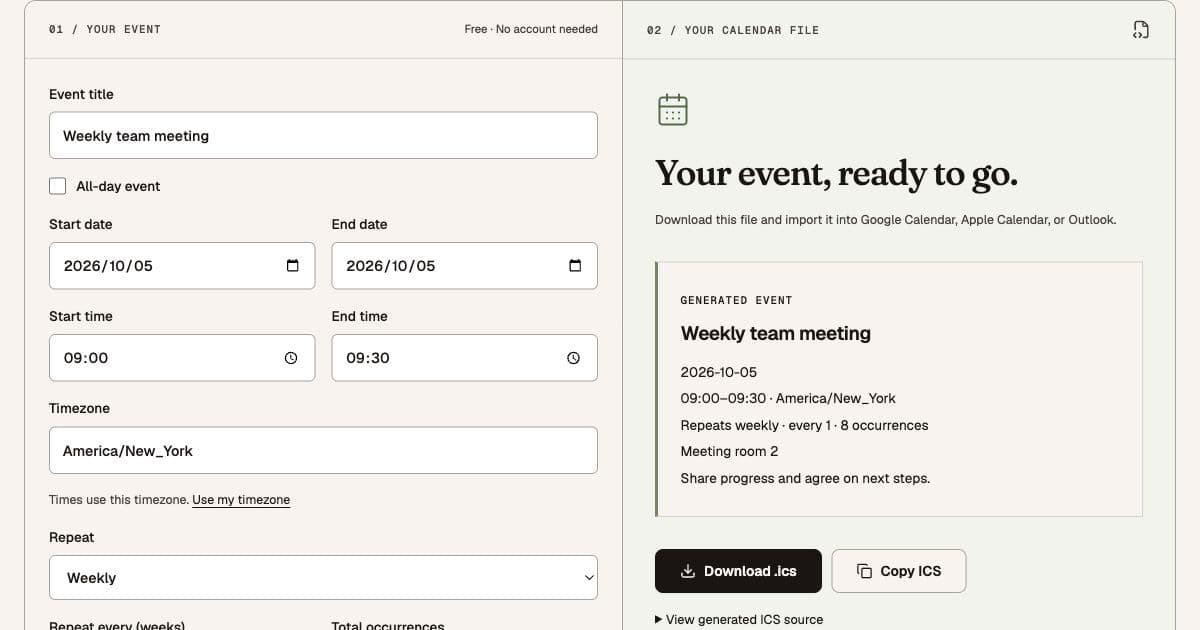
Enter one event or a recurring series, generate the file, and review it before downloading. If your schedule is already in an image or PDF, use one of the extraction tools linked below instead.
Give it a recognizable title and choose the start and end dates. Add times for an appointment, or select all-day for a holiday or workshop. Pick the event’s timezone explicitly; the initial setting is UTC. Use “Use my timezone” to choose your browser’s timezone.
Add an address or meeting URL in Location and put preparation notes in Notes. For a repeating event, set the frequency, interval, and occurrence count. Generate the file to see its event summary and optional ICS source on this page. Editing a field clears the previous file so your next download reflects a freshly generated result.
Download the .ics file or copy its source. Import into a calendar you control and check the first event before sharing the file. No events are added automatically. For a trial run, import into a separate test calendar that you can remove afterwards.
The same download works across the three calendar apps below. Choose your destination and follow its import flow.
A shift starting at 22:00 and ending at 06:00 needs the following day as its end date. The form will not accept an end time before the start on the same day. Each timed event uses one timezone for both start and end; convert flight arrival times into that zone before entering them.
“Every 2 weeks, 8 occurrences” creates eight meetings including the first, not eight additional meetings. This generator supports regular daily, weekly, and monthly patterns. Irregular dates, exceptions, and reminders should be edited in your calendar after import.
If your calendar reports zero new events, the event may already be there. Look at the chosen destination calendar and event date before importing again. If the time appears wrong, compare the event timezone with your calendar’s display timezone. A copied ICS file does not keep two calendars synchronized.
An ICS file generator converts event details into a downloadable iCalendar (.ics) file. This tool creates one event or a recurring series from the information you enter, including dates, times, timezone, location, and notes. You can review the result before importing it into your calendar app.
Yes. Creating and downloading a file here is free, without signing in or using AI credits. This form creates one event or one recurring series per file. Image and PDF extraction is a separate tool with its own usage limits.
Yes. Choose daily, weekly, or monthly, then set the interval and total number of occurrences. The first event counts as occurrence one. A weekly series repeats on the starting weekday; a monthly series repeats on the starting day of the month. Months without that date are skipped, so use a date from the 1st through the 28th if you need an occurrence every month.
Enter the first and last day you want included. For an October 12–13 workshop, select October 12 as the start and October 13 as the last day. The generator writes October 14 as the exclusive end date inside the ICS file, as required by the format. All-day events have no time or timezone.
For a timed event, select the timezone where the event takes place. Calendar apps display the corresponding time in the viewer’s timezone. A 09:00 New York meeting may appear at a different hour in London. Recurring events retain the selected timezone; review occurrences around daylight-saving changes, especially events scheduled in the early morning when clocks change.
No. The file is an importable copy, not a sent meeting invitation or a calendar subscription. You choose when and where to import it. Changing this form later does not update an event already imported, and calendar apps can handle repeated imports differently. Review existing events before importing again to avoid duplicates.
Your entries stay in this page until you generate a file. Generation sends the event details to our server, which creates the ICS response without storing the event. The form is not saved between visits. Analytics record actions and event counts, not event titles, locations, or notes.
Yes, use the linked Image to ICS or PDF to Calendar tools below to extract events from an existing schedule. This generator is for details you type yourself. It does not read files or automatically extract events from pasted text.
Extract events from a schedule photo instead of entering each detail yourself.
Turn a PDF agenda or timetable into editable calendar events.
Review a photographed schedule and prepare it for Google Calendar.